
Before you start
Choose days and start times. Review the current Tapquence screen and the requirements above before changing anything.
- Selected weekdays
- Installed apps
- Trusted website URLs
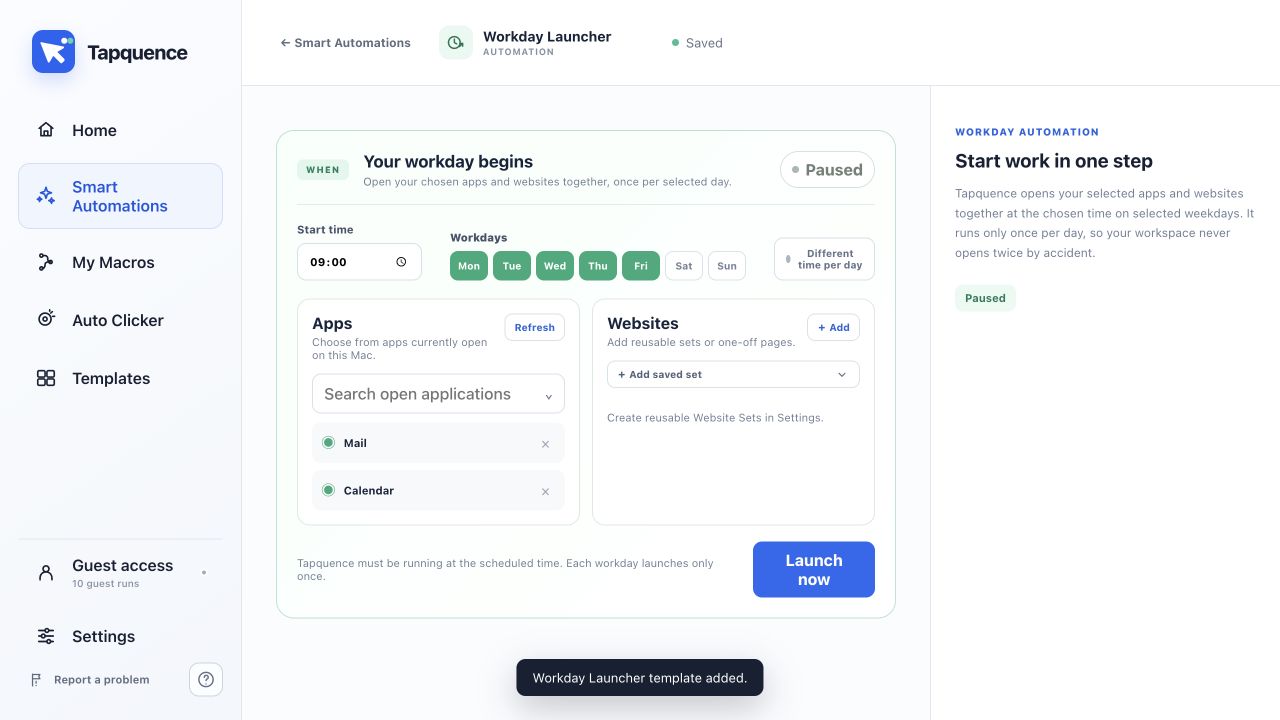
Add the workspace
Workday Launcher opens a chosen set of applications and websites at the start of your workday. It is useful when your routine begins with the same tools but your start time changes between weekdays.
Quick answer
Choose the active weekdays, set a time for each day, add installed apps and trusted website URLs, then enable the automation while Tapquence is allowed to start at login.
1. Select weekdays and start times
Choose only the days you work. Use one time for several days or set a different start time for each weekday.
2. Add applications
Select installed applications from the available list. Include only the tools you actually need at the beginning of the day.
3. Add websites
Enter the full address of each trusted work site. They open in your default browser.
4. Enable startup behaviour
Scheduled automations need Tapquence to be running. Allow Tapquence to start at login when prompted so the launcher can operate after a restart.
5. Test with Launch now
Use the manual launch control before enabling the schedule. Remove unnecessary apps and fix any invalid website addresses.
Test the result
Run the smallest useful example once and verify the result before enabling repetition or relying on the complete workflow.
Troubleshoot
Confirm the installed app, target, folder or meeting is the one described in this guide.
Reduce the workflow to the smallest failing action and change only one setting at a time.
Use harmless data, add more time where needed and keep the stop control available.
Continue learning
Continue with the matching Tapquence feature or move through the guide sequence.
View Workday LauncherSee how this guide connects to the actual workflow.›